
Rendering
Renderer draws the actors of the active scene. It is built on
pixi.js.
An actor is drawn when it has a view component. The renderer creates a pixi.js object for each view component and places it at the actor’s position.
| Component | What it draws | See |
|---|---|---|
Sprite |
An image, a frame from a sprite sheet, or a tiled image | Components |
Shape |
A rectangle, circle, ellipse or line | Components |
BitmapText |
Text with a bitmap font | Components |
Mesh |
Similar to Sprite, but with your own shader |
Shaders |
PixiView |
Any custom pixi.js object you create in code | Components |
Setting it up
Section titled “Setting it up”- In the Systems tab, add Renderer and Camera System.
- Add
Renderer,CameraSystemand the view components you want to use to the engine:
import { Engine, Renderer, CameraSystem, Transform, Sprite, Shape, BitmapText } from 'dacha';
const engine = new Engine({  config,  systems: [Renderer, CameraSystem, ...gameSystems],  components: [Transform, Sprite, Shape, BitmapText, ...gameComponents],  assets: [],});
Renderer has three options:
| Option | What it does |
|---|---|
windowNodeId |
The id of the element the renderer adds its canvas to |
backgroundColor |
The window background color |
filterEffects |
Post-processing for the whole screen. See Filter effects |
Order in the systems list
Section titled “Order in the systems list”Renderer needs CameraSystem, and CameraSystem must come before it in the systems list.
See Camera.
Put Renderer after every system that moves actors or changes their view components. The
renderer draws in update, and it draws the state it finds at that moment. A change made by a
system below it appears one frame later.
How an actor is drawn
Section titled “How an actor is drawn”The renderer places each view at the actor’s Transform. Position, rotation and scale all
apply. The view is centered on the actor’s position.
An actor can have several view components, one of each kind. For example, a Sprite for the
body and a BitmapText for a name above it.
A child actor moves, rotates and scales with its parent, as its Transform says.
The renderer reads the view components in every update. Change a field, such as opacity or
color, and the next frame shows the change.
If the actor has an Interpolation component, the renderer draws it at
the smoothed position instead of its Transform.
Draw order
Section titled “Draw order”Two settings decide what is drawn in front: the sorting layer of each view, and the sorting
order inside a layer. You find both under Sorting in the editor’s Project settings tab. They
are the sorting entry in global options.
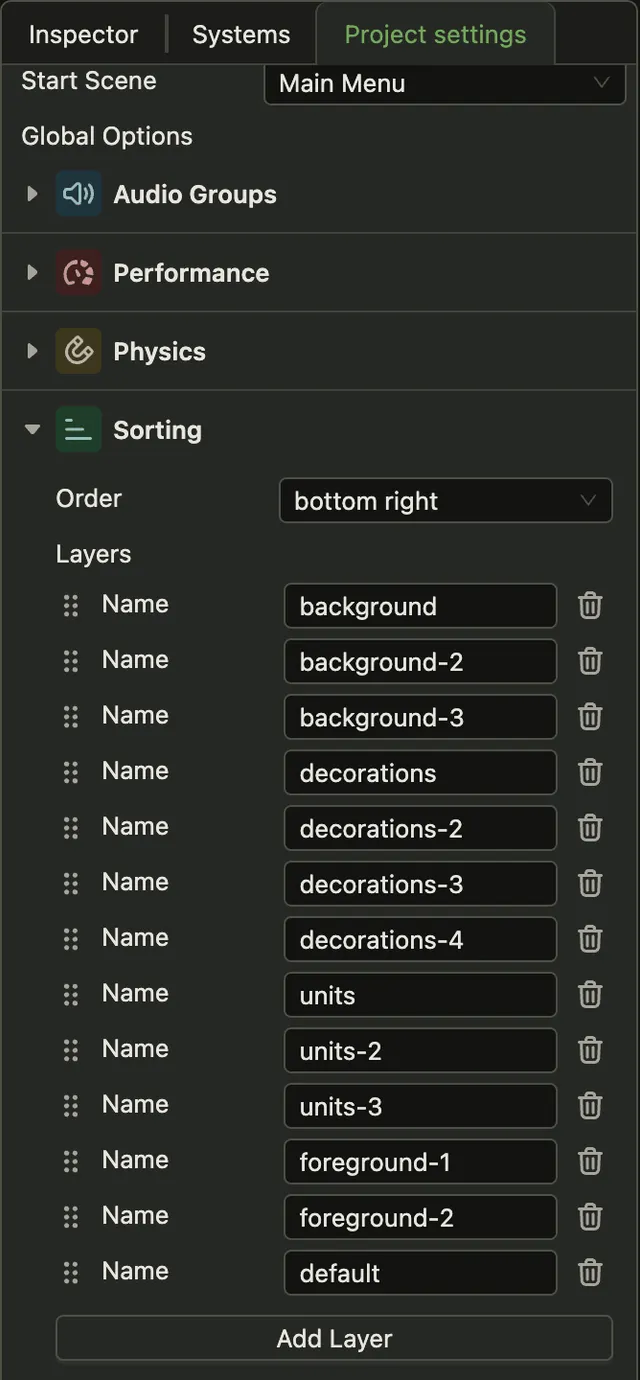
The actor hierarchy does not affect draw order. A child actor is not drawn above its parent unless the sorting settings put it there.
Sorting layers
Section titled “Sorting layers”Every view component has a sortingLayer field with the name of a layer. The layers are drawn in
the order of the list. The first layer is at the back, and the last layer is in front.
Sorting inside a layer
Section titled “Sorting inside a layer”Inside a layer, the renderer sorts views by position in every frame. It compares y first, then
x when y is equal. The order setting says which views are drawn in front:
| Order | Drawn in front |
|---|---|
bottomRight |
Lower views. At the same height, views farther right |
bottomLeft |
Lower views. At the same height, views farther left |
topLeft |
Higher views. At the same height, views farther left |
topRight |
Higher views. At the same height, views farther right |
bottomRight is the default.
The renderer sorts by the center of the view. Use sortOffset to move the point the renderer sorts by.
For example, a tree 64 pixels tall stands on the ground at its bottom edge, so give it a sortOffset of
{ x: 0, y: 32 }.
Loading images and fonts
Section titled “Loading images and fonts”The renderer loads images and fonts by path. It does not use the engine’s asset registry.
When a scene loads, the renderer collects every path from two places:
- the
Sprite,MeshandBitmapTextcomponents of the actors in that scene, - the same components in all templates of the project.
The scene becomes active only after these files have loaded. So an actor you spawn from a template is drawn with its image from the first frame.
A path that appears in neither place is not loaded in advance:
- An actor you create in code with a new path loads its image in the background. Until the image arrives, the sprite is drawn as a white rectangle.
- If you change
srcof an existing sprite to a path that was never loaded, nothing changes. The sprite keeps its previous image.
The renderer samples all textures with the nearest pixel, with no smoothing.
RendererAPI
Section titled “RendererAPI”Get RendererAPI from the world:
import { RendererAPI } from 'dacha';
const renderer = world.systemApi.get(RendererAPI);| Method | What it does |
|---|---|
intersectsWithPoint(x, y) |
Returns the actors whose views contain the point, the one drawn in front first |
intersectsWithRectangle(minX, minY, maxX, maxY) |
Returns the actors whose view centers are inside the rectangle |
getBounds(actor) |
Returns the rectangle that contains all views of the actor, or null if it has none |
getRenderingContext() |
Returns the pixi.js Application |
addFilterEffect, removeFilterEffect, clearFilterEffects, getFilterEffects |
Change filter effects at runtime. See Filter effects |
All coordinates are world coordinates.
intersectsWithPoint and getBounds use the axis-aligned rectangle around each view, not its
exact shape. A click on a transparent corner of a sprite still hits it.
Finding the actor under the pointer
Section titled “Finding the actor under the pointer”MouseControl events carry the pointer position in world coordinates. Pass it to
intersectsWithPoint:
import { RendererAPI } from 'dacha';import type { MouseControlEvent } from 'dacha/events';
private handleClick = (event: MouseControlEvent): void => {  const renderer = this.world.systemApi.get(RendererAPI);  const [topActor] = renderer.intersectsWithPoint(event.x, event.y);
  if (topActor) {    // the player clicked topActor  }};