
Templates
A template is a reusable actor definition. Place a hundred instances of one template, change the template once, and all hundred change with it. A hundred copied actors give you none of that.
A template is also the only way to create an actor while the game runs.
Creating a template
Section titled “Creating a template”Templates have their own tab in the explorer. A template can hold child templates, and placing the parent places the whole branch.
The editor cannot turn an actor that is already in a scene into a template. Build the template first, then place instances of it.
Placing instances
Section titled “Placing instances”Select the template tool in the toolbar, pick the template, then click in the viewport.

The template tool’s options.
With this tool, Snap to Grid aligns the instance by its bounds, not by its origin, so tiles meet edge to edge. Nesting makes the instance a child of the selected actor.
What an instance stores
Section titled “What an instance stores”An instance is an ordinary actor with a link to its template. Placing one writes a single
component: a Transform with the position you clicked. Everything else comes from the
template.
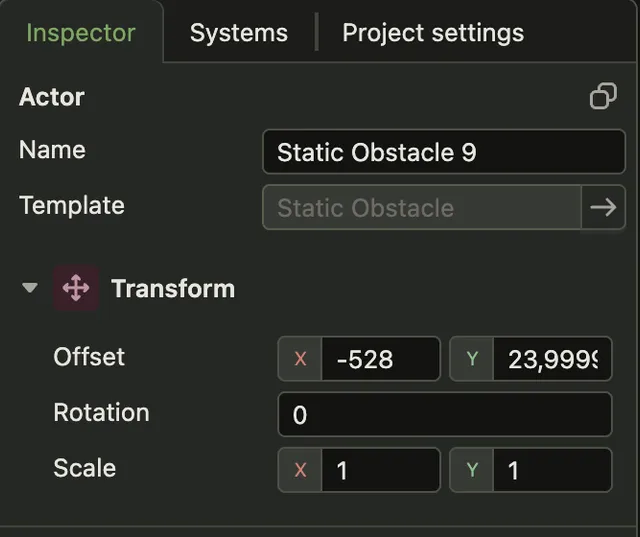
The components the inspector lists for an instance are its overrides.
Overriding a component
Section titled “Overriding a component”When the engine builds an instance, it applies the template’s components first and the instance’s components second. A component on the instance replaces the template’s component of that name completely. Overrides work per component, not per field.
Add Component on the instance creates an override. It starts from the component’s default values, not from the template’s, so retype the values you want to keep.
Changing a template
Section titled “Changing a template”Edit a template and every instance follows, unless the instance overrides that component.
Deleting a template removes every instance of it from every scene.
Spawning at runtime
Section titled “Spawning at runtime”Bullets and enemies are not placed by hand. A system or a behavior spawns them from a template while the game runs, and it addresses the template by id:
const bullet = this.actorSpawner.spawn(BULLET_TEMPLATE_ID);The copy button in the inspector header copies the selected template’s id. Creating and destroying actors covers what to do with the actor once you have it.