Collisions
When two colliders overlap, the physics system sends collision events to both actors. Collision layers decide which colliders can interact.
Collision events
Section titled “Collision events”The physics system sends three events:
| Event | When it is sent |
|---|---|
CollisionEnter |
When two colliders start to touch |
CollisionStay |
Every step while they are still in contact |
CollisionLeave |
When contact is lost |
Each of the two actors gets its own event. The event has these fields:
| Field | What it holds |
|---|---|
target |
The actor that got the event |
actor |
The other actor |
normal |
The direction from target to the other actor |
penetration |
How deep the colliders overlap along normal, in world units |
contactPoints |
The points where the colliders touch, in world space. One or two points |
Listening for collisions
Section titled “Listening for collisions”Events climb the hierarchy, so a listener on the scene gets the collision events of every actor. Each collision reaches the scene twice, once for each actor. See events climb the hierarchy.
import { CollisionEnter, type CollisionEnterEvent } from 'dacha/events';
// somewhere in your systemconst handleCollisionEnter = (event: CollisionEnterEvent): void => {  const { target, actor } = event;
  // do something};
scene.addEventListener(CollisionEnter, handleCollisionEnter);
Two touching colliders send events when both are enabled and their layers collide. The bodies do
not matter, with one exception: two static bodies get no events about each other.
Triggers
Section titled “Triggers”A trigger is an actor with a Collider and no RigidBody. Bodies pass through it, and it
still gets collision events.
Use triggers for pickups, checkpoints, damage zones, and the area where a door opens.
Collision layers
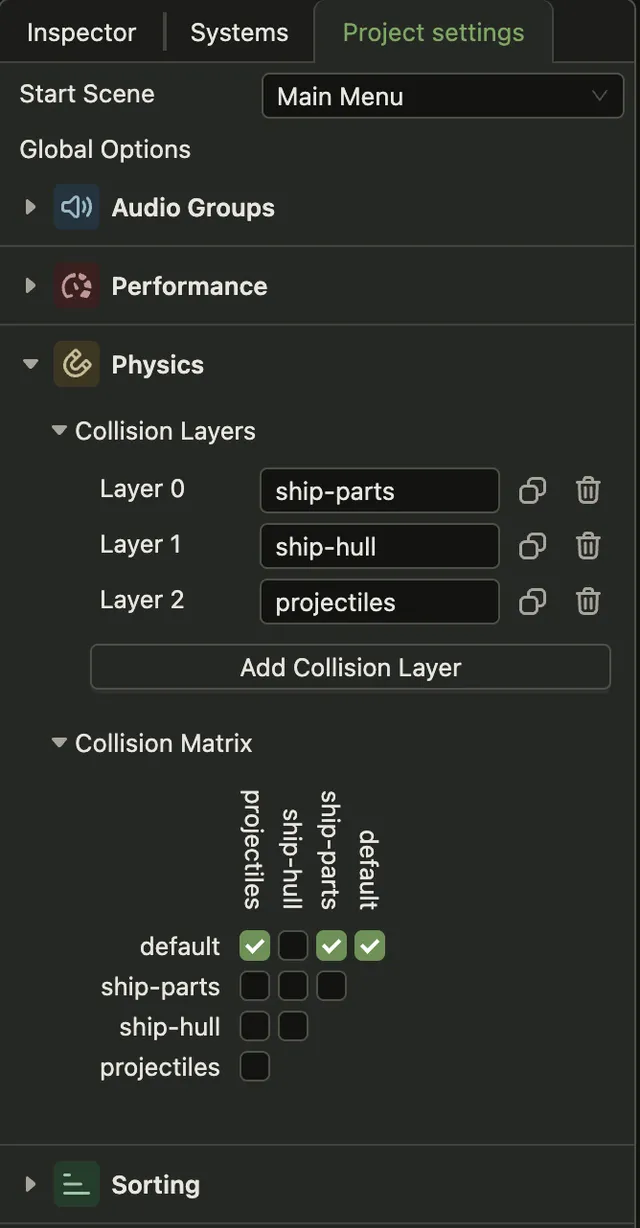
Section titled “Collision layers”Every collider belongs to one collision layer. The collision matrix says which pairs of layers collide.
Colliders on layers that do not collide pass through each other and get no events. Use layers to stop the player’s bullets from hitting the player, or to let enemies walk through each other.
Editing layers
Section titled “Editing layers”You edit layers in the Project settings tab, in the Physics panel. Add Collision Layer adds a
layer. Then pick it in the layer field of a Collider.